Organizing My First Project Folder
This unit was quite interesting because it introduced me to a different way of organizing files on a computer.
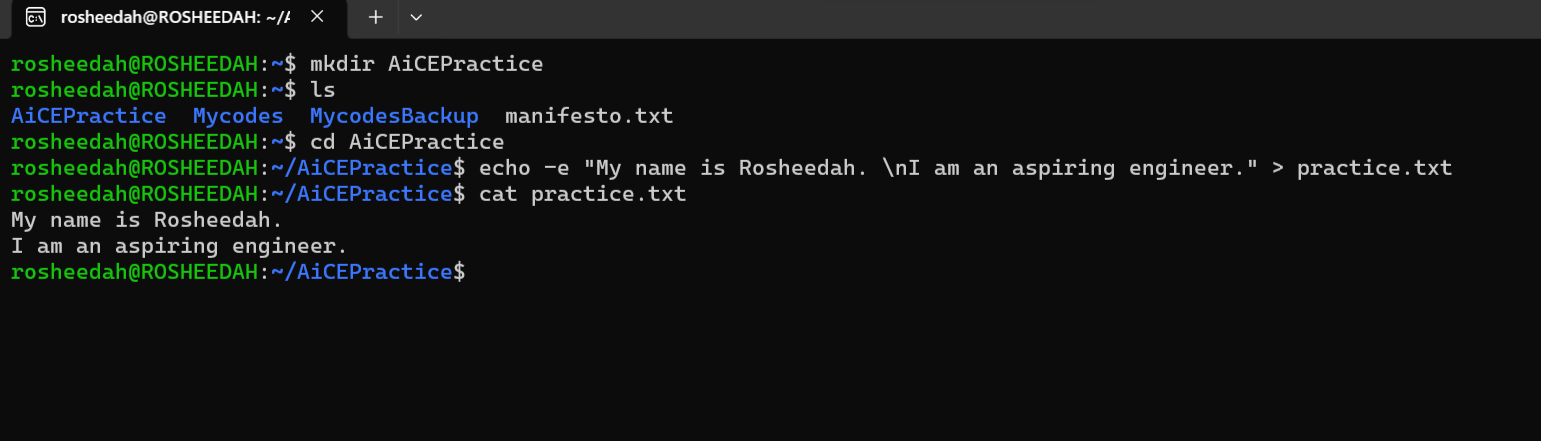
I started by using the mkdir practice command to create a new directory named AiCEPractice. Then, I used ls to check that the directory had been created successfully.
Next, I used cd practice to enter the directory. This was followed by the echo command to create a text file named practice.txt and write two sentences into it:
echo -e "My name is Rosheedah. \nI am an aspiring engineer." > practice.txtI used -e to enable the interpretation of escape characters and \n to ensure that the two sentences appeared on separate lines. The > symbol redirected the text into the file.
Finally, I used cat practice.txt to display the contents of the file and confirm that the text had been saved correctly.
What I learned: I find it fascinating that tasks we normally perform with a mouse, such as creating folders and files, can also be done by entering commands in a terminal. This exercise has opened my eyes to a different way of interacting with a computer. It is interesting to discover how much can be accomplished with just a few commands, without necessarily using a mouse. 🤩