Organizing My First Project Folder
This unit was quite interesting because it introduced me to a different way of creating and managing files on a computer using the Linux terminal.
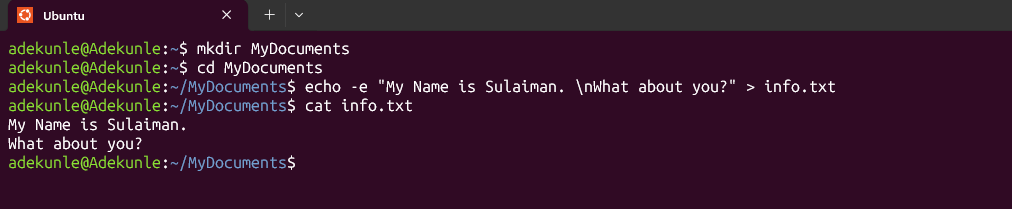
I started by using the mkdir linux_command_practice command to create a new directory named MyDocuments. Next, I used cd MyDocuments to enter the newly created directory.
After that, I used the echo command to create a text file named info.txt and write a sentence inside it:
echo -e "My Name is Sulaiman. \nWhat about you?" > info.txt." The echo command was used to write the text, while the > symbol redirected the text into the file and saved it as info.txt.
Finally, I used the cat info.txt command to display the contents of the file and confirm that the text had been saved correctly.
What I learned: I learned how to create directories, navigate between folders, create text files, write information into files, and display saved content using Linux commands. I find it interesting that tasks we normally perform using a mouse can also be accomplished by entering simple commands in a terminal. This exercise has helped me understand a new way of interacting with a computer and made me more interested in learning Linux. 🤩
#mkdir #echo #cat #learned