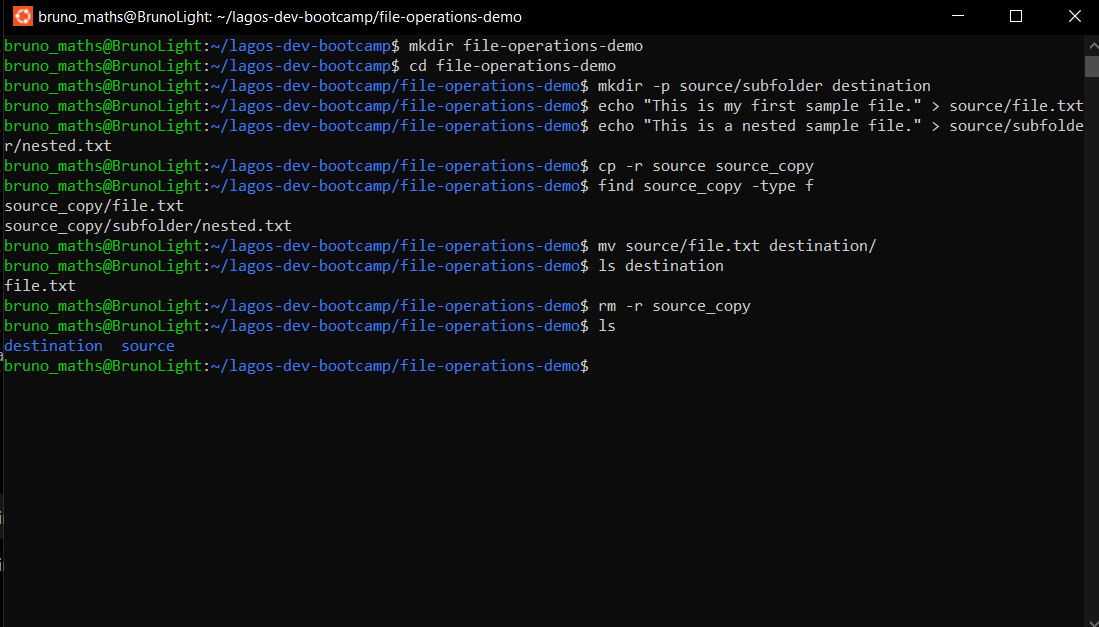
Practicing File Operations in the Terminal
Practicing File Operations in the Terminal
1. Copying a directory using cp -r
I used cp -r source source_copy to copy the source directory recursively. The -r flag allowed the command to copy the directory together with all its subdirectories and files.
2. Moving a file using mv
I used mv source/file.txt destination/ to move a text file from the source directory into the destination directory.
3. Deleting a directory using rm -r
I used rm -r source_copy to delete the copied directory and all its contents. The -r flag enabled recursive deletion.
Differences Between cp, mv, and rm
cp: Copies files and directories without removing the original.
mv: Moves files or directories from one location to another. It can also rename them.
rm: Removes files and directories. The
-rflag allows it to delete directories and their contents recursively.
What I Learned
I learned how to copy directories recursively, move files between directories, and delete directories containing files and subdirectories. I also understood the differences between cp, mv, and rm, and how command flags affect their operations.