PRACTICING FILE OPERATIONS IN THE TERMINAL
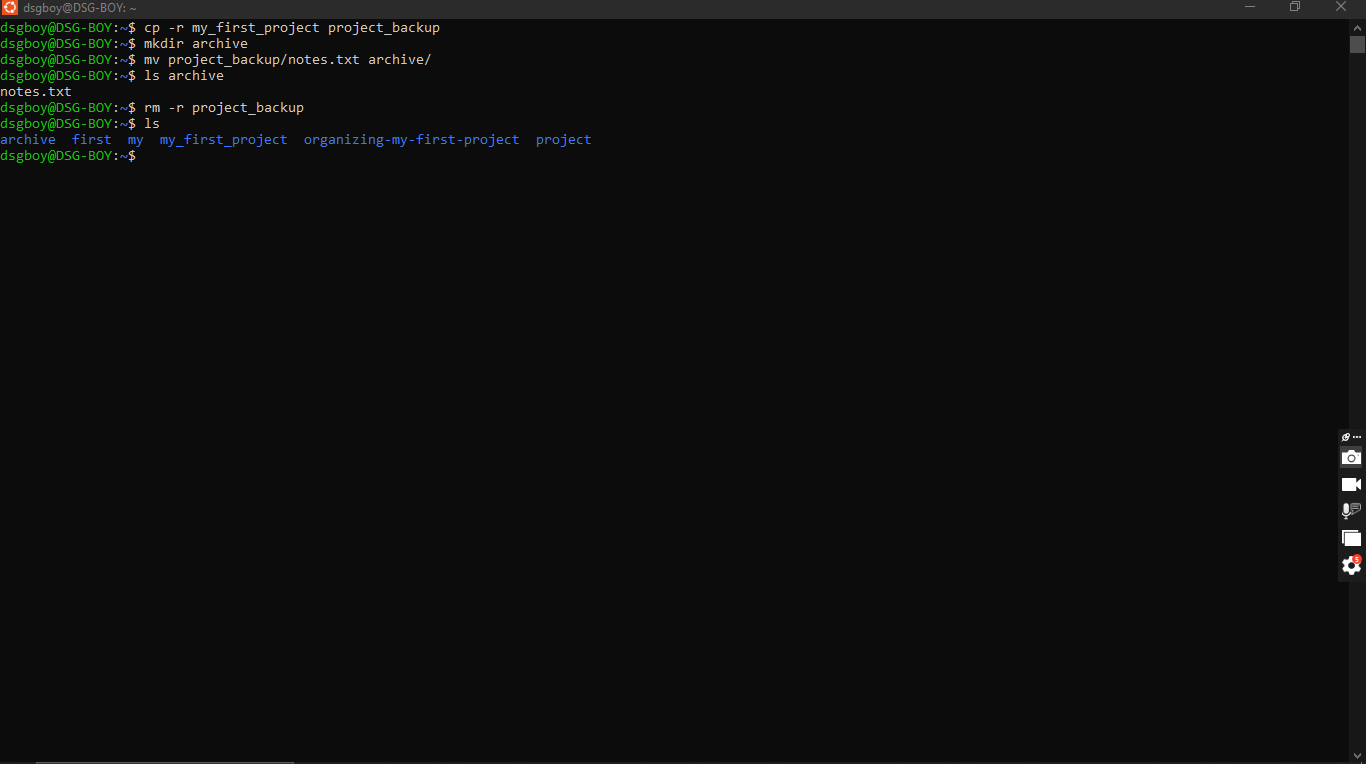
For this task, I practised three things in the Ubuntu terminal: copying a folder, moving a file, and deleting a folder. I used the my_first_project folder from my last task, so I had something real to work with.
I started with cp -r my_first_project project_backup. cp makes a copy, and the -r flag tells it to copy everything inside the folder too. Without -r, the terminal refuses to copy a folder. After that I ran mkdir archive to build an empty folder, then mv project_backup/notes.txt archive/. mv picks a file up and puts it somewhere else, so notes.txt left project_backup and landed in archive. I ran ls to check each step, and it showed me the file had really moved. Last, I ran rm -r project_backup. rm deletes things, and -r lets it remove a whole folder with everything in it.
The way I understand the three now:
cp is like photocopying a paper. I end up with two, and the original stays.
mv is like carrying the paper to another room. It’s no longer in the old one.
rm is like deleting it. It’s gone, and there is no undo.
What I learned is that a tiny flag like -r changes how a command behaves, and that rm needs extra care because nothing goes to a recycle bin. I also learned that running ls often is the easiest way to confirm what the terminal actually did.
#cp #mv #rm #learned