Organizing My First Project Folder
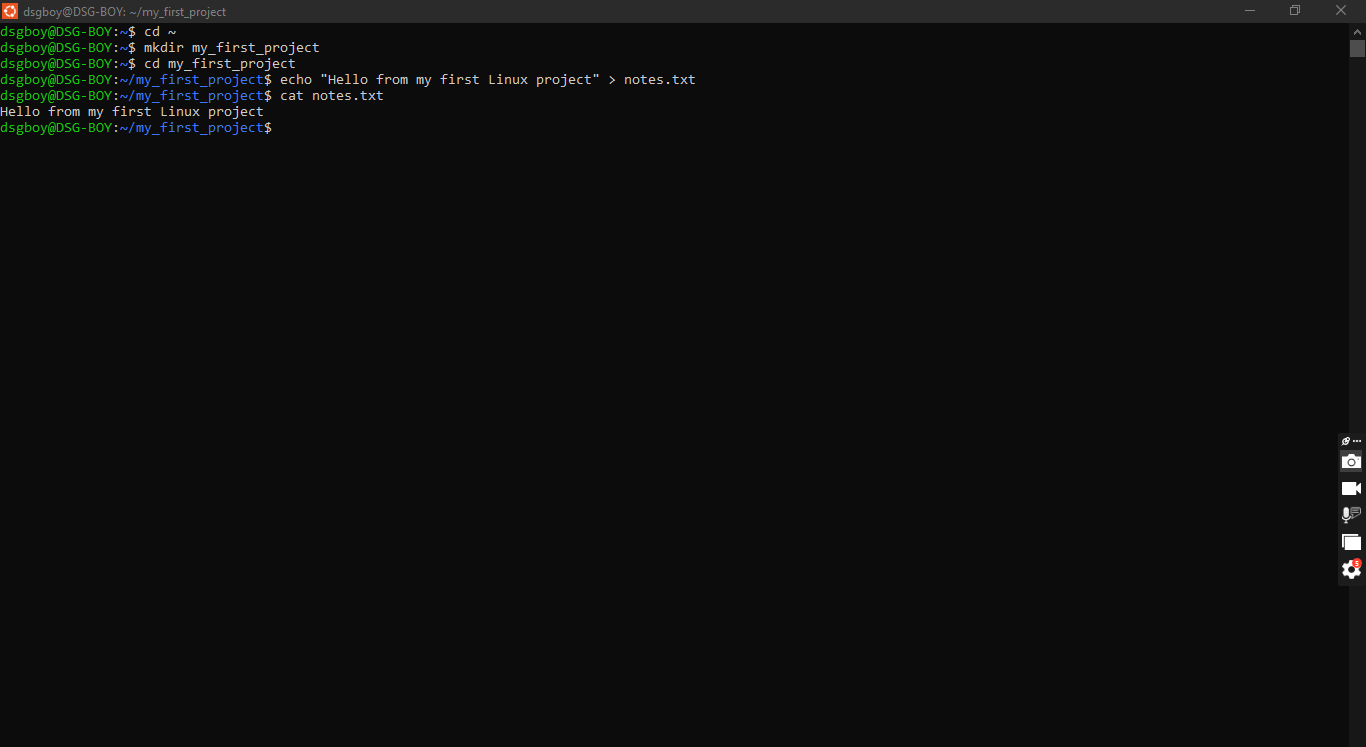
This task was my first real time using the Ubuntu terminal, and it took me a few tries. The goal was to make a folder, put a file inside it, and read the file back.
I started with mkdir my_first_project. mkdir simply builds a new folder with whatever name you give it. Next I used cd my_first_project to step inside. Then came echo "Hello from my first Linux project" > notes.txt. echo repeats the words you give it, and the > sends those words into a file called notes.txt instead of printing them on screen. To check my work, I ran cat notes.txt, and cat showed me what was inside the file.
It didn’t work smoothly the first time. Here is what went wrong:
I pasted with Ctrl+V and got “command not found.” The terminal printed
^Vinstead of pasting. Right-click or Ctrl+Shift+V is what works here.I got “mkdir: File exists.” I had already created the folder in an earlier attempt, so it refused to make it again.
My prompt got stuck on a lonely
>. I forgot the closing quote in myechocommand, so the terminal kept waiting for me to finish. Ctrl+C got me out.
Because of these mistakes, my screen got messy, and I had to clear, clear, and clear again, then start over each time, until the commands finally ran cleanly. It was a bit frustrating, but it showed me that the terminal does exactly what I type, so every quote and every letter matters.
What I learned is that each command does one small job, and that echo with > can create a file without opening any editor. I also learned that mistakes are normal and fixable, and that a clean screen helps me see what I’m doing.
#mkdir #echo #cat #learned